
1. 문제 발생
기존에 특정 채팅방에 접속했을 때, 소켓이 열리도록 한 로직을
접속해있지 않은 채팅방의 메시지도 실시간으로 업데이트 하기 위해 웹소켓을 여는 로직을 커스텀 훅으로 만들어서
채팅 목록 페이지에 접근했을 때 소켓이 열리도록 로직을 수정했다.
그 과정에서 특정 채팅방(A) 를 나가서 다른 채팅방 (B)를 옮겨갔음에도 B 채팅방에 보낸 메시지가 A 채팅방에도 전달되는 버그가 있었다.
2. 원인 추론
위에서 언급했다시피 기존에 특정 채팅방에 접속해야 열리는 소켓을 커스텀 훅으로 만들어서 따로 파일을 만들었다.
아래는 변경하기 전 코드의 일부다.
onConnect 내의 로직을 변경했다.
기존에는 특정 채팅방에 대한 구독만 했기 때문에 그냥 chatroomId을 redux 의 state에서 받아왔다.
  const dispatch = useDispatch();
  const { chatroom, messages } = useSelector((state: RootState) => state.chat);
  const clientRef = useRef<Client | null>(null);
  const chatroomId = chatroom?.chatroomId;

  useEffect(() => {
    const chatTopic = `/topic/chatroom/${chatroomId}`;

    if (!chatroomId) return;

    clientRef.current = new Client({
      webSocketFactory: () => {
        const socket = new SockJS(`http://localhost:8080/ws`)
        return socket;
      }, // 소켓 연결 반환
      onConnect: () => {
        // 소켓 연결 시 호출 함수
        // 채팅방 구독
        clientRef.current?.subscribe(chatTopic, (message) => {
          // 수신 메시지 처리
          const chatMessage = JSON.parse(message.body).body.data;
          // 메시지 리덕스에 저장
          dispatch(setMessages([...messages, chatMessage]));
        });
      },
    }, [dispatch, chatroomId, messages]); // 이하 코드 생략
그러나 아예 로그인했을 때 소켓을 열기 위해서 커스텀 훅으로 만들었고
아래와 같은 로직으로 변경했다.
const useWebSocket = (chatroomIds: number[]) => {
  const clientRef = useRef<Client | null>(null);
  const dispatch = useDispatch();

  useEffect(() => {
    const jwt = getJwtFromCookies();

    // 클라이언트 초기화
    clientRef.current = new Client({
      webSocketFactory: () => new SockJS(`http://localhost:8080/ws`),
      connectHeaders: {
        Authorization: `Bearer ${jwt}`,
      },
      onConnect: () => {
        // 모든 채팅방에 대해 구독
        chatroomIds.forEach((chatroomId) => {
          const chatTopic = `/topic/chatroom/${chatroomId}`;
          clientRef.current?.subscribe(chatTopic, (message) => {
            const chatMessage = JSON.parse(message.body).body.data;
            dispatch(setMessages((prevMessages) => [...prevMessages, chatMessage]));
          });
        });
      },
    });

    clientRef.current.activate();

    return () => {
      clientRef.current?.deactivate();
    };
  }, [chatroomIds, dispatch]);
};
변경된 부분은 기존에 redux 에서 받아왔던 특정 채팅방의 아이디를 받는 것이 아니라
props 로 참여하고 있는 모든 채팅방의 ID 를 배열로 받아왔다.
그 다음, forEach 메서드를 써서 참여중인 모든 채팅방을 구독하는 것으로 변경했다..
여기에서 문제가 발생했다.
모든 채팅방에 대해 구독을 하다보니, 방을 옮겨갔음에도 메시지가 다른 방에 전달되는 것처럼 보였다는 것이다.
gpt 선생님과 검색을 통해 씨름하면서 얻은 결과는
새로운 채팅방으로 옮겨갔을 때, 그 이전 채팅방에 대한 구독이 해제되지 않아서 옮기기 전의 방에 메시지가 전달된다는 것이었다.
3. 해결 방안
로그인했을 때, 내가 참여한 모든 채팅방에 대해 구독을 해야하는 상황이었기 때문에
구독을 해제하기가 난감한 상황이었다.
그래서 생각해낸 것은 내가 현재 구독하고 있는 채팅방의 아이디를 받아와서
조건문을 걸어서 내가 현재 있는 채팅방에 대해서만 메시지가 보이도록 하는 것이었다.
const useWebSocket = (chatroomIds: number[], currentChatroomId?: number) => {
  const { messages } = useSelector((state: RootState) => state.chat);
  const subscriptionsRef = useRef<Map<number, any>>(new Map());
  const notificationRef = useRef<any>(null);
  const clientRef = useRef<Client | null>(null);
  const dispatch = useDispatch();

  useEffect(() => {
    const url = process.env.REACT_APP_API_URL || "http://localhost:8080";
    const jwt = getJwtFromCookies();
    const userId = Number(extractUserIdFromCookie());
    if (!jwt) return;

    // 클라이언트 초기화
    clientRef.current = new Client({
      webSocketFactory: () => new SockJS(`${url}/ws`),
      reconnectDelay: 5000,
      heartbeatIncoming: 20000,
      heartbeatOutgoing: 20000,
      connectHeaders: {
        // Authorization: `Bearer ${jwt}`,
      },
      onConnect: () => {
        // 모든 채팅방에 대해 구독
        chatroomIds.forEach((chatroomId) => {
          if (!subscriptionsRef.current.has(chatroomId)) {
            const chatTopic = `/topic/chatroom/${chatroomId}`;
            const subscription = clientRef.current?.subscribe(
              chatTopic,
              (message) => {
                console.log(JSON.parse(message.body));

                const chatMessage = JSON.parse(message.body).headers
                  ? JSON.parse(message.body).body.data
                  : JSON.parse(message.body);
                console.log(chatMessage);

                // 들어 있는 방 확인
                if (chatMessage.chatroomId === currentChatroomId) {
                  dispatch(setMessages([...messages, chatMessage]));
                } else if (chatMessage.senderId !== userId) {
                  // 안들어가있는 방 메시지 쌓기
                  dispatch(addUnreadMessages(chatMessage));
                }

                // 마지막 메시지 업데이트
                dispatch(
                  updateLastmessage({
                    chatroomId,
                    lastMessage: chatMessage.chatmsgContent,
                    lastMessageCreatedAt: chatMessage.createdAt,
                  })
                );
              }
            );
            subscriptionsRef.current.set(chatroomId, subscription);
          }

          // 구독 해제
          subscriptionsRef.current.forEach((subscription, id) => {
            if (!chatroomIds.includes(id)) {
              subscription.unsubscribe();
              subscriptionsRef.current.delete(id);
            }
          });
        });
      },
    });

    clientRef.current.activate();

    return () => {
      clientRef.current?.deactivate();
      subscriptionsRef.current.forEach((subscription) =>
        subscription.unsubscribe()
      ); // 모든 구독 해제
      subscriptionsRef.current.clear();
    };
  }, [chatroomIds, currentChatroomId]);
  }
더 상세히 말하자면
1) subscriptionsRef 설정
const subscriptionsRef = useRef<Map<number, any>>(new Map());
userRef 를 이용해서 Map 객체를 참조했다.
키-값 쌍으로 저장하는 특징을 이용해서 채팅방 ID 를 키로 사용해 특정 구독 정보를 빠르게 조회하고,
구독 관리에 유용하게 하기 위함이다.
아래의 코드로 구독 객체를 값으로 추가할 수 있다.
subscriptionsRef.current.set(chatroomId, subscription);
그리고 조건문을 걸었다.
아래의 코드로 현재 구독 목록에 존재하는지 확인하고,
존재하지 않는 경우에만 새 구독을 생성해서 중복 구독을 방지했다.
if(!subscriptionsRef.current.has(chatroomId)){...}
2) 현재 접속한 채팅방인지 확인
현재 자기가 접속한 채팅방인지 확인한 후, 현재 채팅방의 메시지만 messages 배열에 dispatch 할 수 있도록
조건문을 걸어주었다.
// 현재 채팅방인지 확인
if (chatMessage.chatroomId === currentChatroomId) {
  dispatch(setMessages([...messages, chatMessage]));
}
그러기 위해서 useWebSocket 커스텀 훅을 불러올 때, 접속한 채팅방의 아이디를 확인할 수 있도록 파라미터를 전달해주었다.
그리고 서버로부터 받은 채팅방 아이디 정보를 파라미터로 전달받은 채팅방 아이디와 비교하여
동일할 때만 setMessages 에 dispatch 할 수 있게 했다.
4. 결과
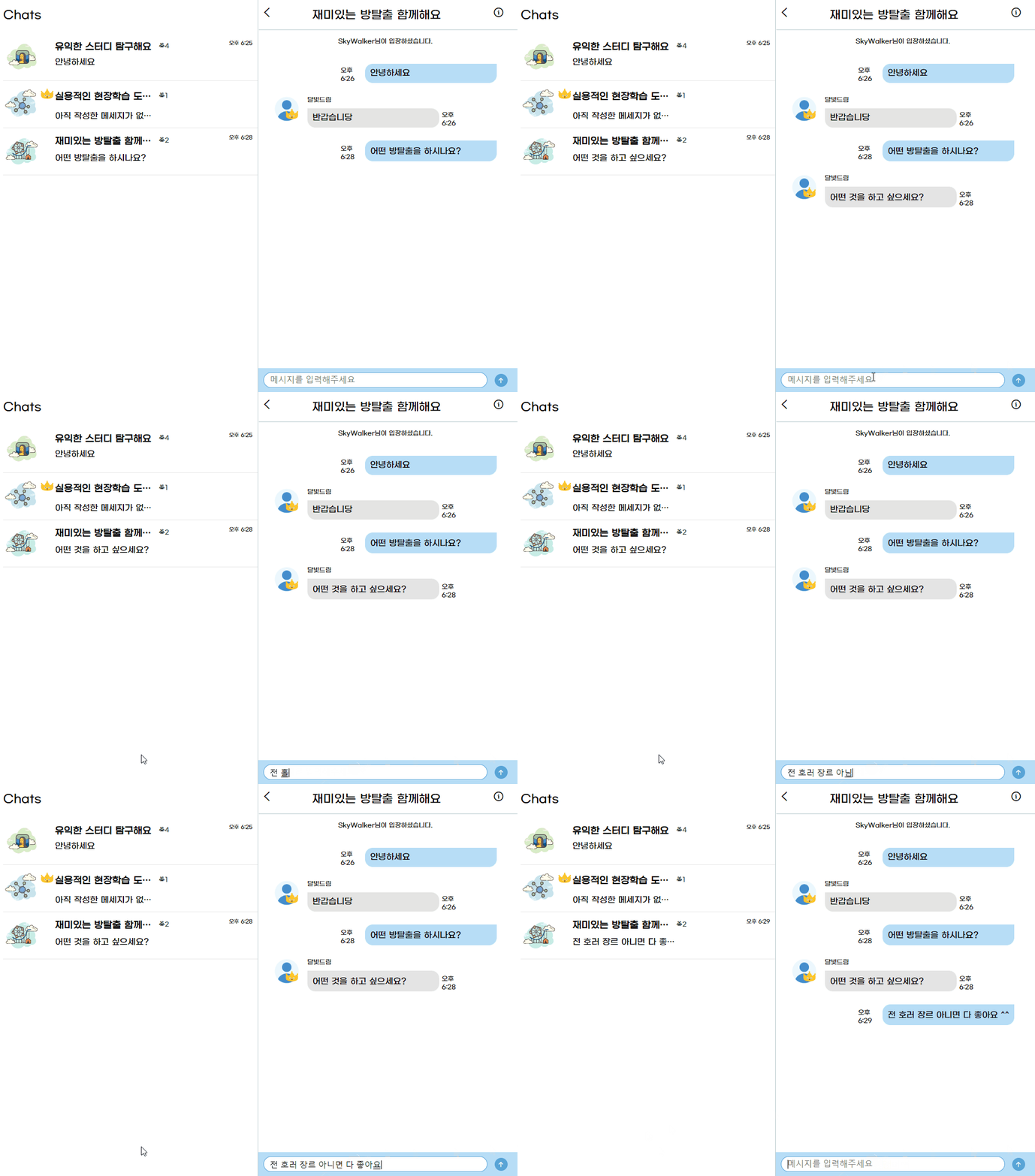
이런식으로 채팅을 하면서 목록도 갱신되는 구조를 성공적으로 구현할 수 있었고,
현재 자신이 위치한(접속한) 채팅방에만 메시지가 전달되는 것을 확인할 수 있었다.
'Project > SeSAC 3차 팀 프로젝트' 카테고리의 다른 글
| 3차 팀 프로젝트 리팩토링 #2 (채팅방 입/퇴장 메시지) (0) | 2024.11.20 |
|---|---|
| 웹 개발자 부트캠프 과정 3차 팀 프로젝트 회고 #2 (0) | 2024.11.17 |
| 3차 팀 프로젝트 채팅 기능 트러블 슈팅 #2 (부제 : 채팅 송수신 시간이 이상해요..! ㅠ) (0) | 2024.11.14 |
| 3차 팀 프로젝트 리팩토링 #1 (채팅 페이지 UI 변경) (1) | 2024.11.10 |
| 3차 팀 프로젝트 채팅 기능 트러블 슈팅 #1 (부제: 내 채팅이 두 번 보내져요! ㅠㅠ) (0) | 2024.11.09 |