728x90
자바스크립트에서 this 는 기본적으로 자기 자신을 참조하는 객체다.
그러나 어디에서 호출되느냐에 따라 다른 객체를 참조한다.
1. 객체 메서드에서 객체 자신을 의미
    const obj = {
        name : '고양이',
        getName(){
            console.log('객체 메서드의 this >>>', this);
            console.log('객체 메서드의 속성 읽기 >>>', this.name);
        }
    }

    obj.getName()
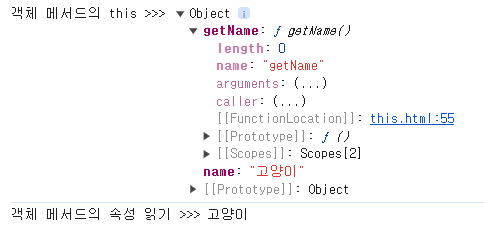
※ 단, 화살표 함수는 전역 객체(window)를 의미힌다.
    const obj = {
        name : '고양이',
        fn1 : function () {
            console.log('객체 익명 메서드 this>>', this);
            console.log('객체 익명 메서드에서 객체 속성>>>', this.name);

        },
        fn2 : () => {
            console.log('객체 안 화살표 함수 this>>>', this);
            console.log('객체 안 화살표 함수 객체 속성(this)', this.name);
            console.log('객체 안 화살표 함수 객체 속성(객체명)', obj.name);
        }
    }

    obj.fn1()
    obj.fn2()

2. 전역에서 전역 객체 window 를 의미
console.log('전역에서 this >>>',this);
3. 일반 함수 내부에서 전역 객체 window를 의미
    function fn1() {
        console.log(this);
    }

    fn1()

익명 함수에서도 같다.
(function() {
   console.log('익명함수에서 this >>>', this);

})()
화살표 함수에서도 같다.
(()=>{console.log('화살표함수에서 this >>> ', this);})()
※ 단, "use strict" 모드에서 일반 함수의 this는 undefined 가 나온다!
화살표 함수는 strict 모드에서도 window 객체를 가리킨다.
    function fn1() {
        console.log('strict mode',this);
    }

    fn1();

    (function() {
       console.log('익명함수에서 strict mode this >>>', this);

    })();

    (()=>{
        console.log('화살표함수에서 strict mode this >>> ', this);
    })();
4. 이벤트 함수에서는 이벤트를 호출한 자기 자신을 의미
<button class="btn">클릭!</button> const btn = document.querySelector('.btn')
btn.addEventListener('click', btnClick)
function btnClick() {
    console.log('이벤트 함수 this', this);
}
※ html 태그내에서 직접 이벤트 함수를 호출했을 때의 this는 window 객체를 가리킴
<button class="btn" onclick="btnClick()">클릭!</button>function btnClick() {
console.log('이벤트 함수 this', this);
}
※ 화살표 함수는 상위 이벤트 요소를 가리킨다.
const btn = document.querySelector('.btn')

btn.addEventListener('click', ()=>{
    console.log('이벤트 화살표 함수 this', this);
})
위의 예제에서는 버튼의 상위 요소가 window라 window 가 찍힘
버튼의 상위 요소에 다른 요소가 있다면?
<div class="btn-box">
    나는 버튼 박스
    <button class="btn1">클릭1</button>
    <button class="btn2">클릭2</button>
</div>
    const btnBx = document.querySelector('.btn-box')
    const btn1 = document.querySelector('.btn1')
    const btn2 = document.querySelector('.btn2')

    btnBx.addEventListener('mouseenter', mouseEnter)

    function mouseEnter() {
        console.log('마우스 입장 이벤트 this',this);
        btn1.onclick = function () {
            console.log('일반 익명 함수 클릭 이벤트 this >>>', this);
        }
        btn2.onclick = () => {
            console.log('화살표 함수 클릭 이벤트 this >>>', this);
        }
    }

일반 익명 함수는 this 가 자기 자신을 가리키지만, 화살표 함수에서는 상위 요소를 가리킨다
결론!
이와 같이 자바스크립트에서의 this는 호출 방식에 따라 동적으로 결정되기 때문에
상황에 맞게 알맞게 호출해야한다!
Reference
모던 자바스크립트 Deep Dive
모던 자바스크립트 Deep Dive | 이웅모 - 교보문고
모던 자바스크립트 Deep Dive | 269개의 그림과 원리를 파헤치는 설명으로 ‘자바스크립트의 기본 개념과 동작 원리’를 이해하자!웹페이지의 단순한 보조 기능을 처리하기 위한 제한적인 용도로
product.kyobobook.co.kr
728x90
'Study > Javascript' 카테고리의 다른 글
| 로컬 스토리지(Local Storage)와 세션 스토리지(Session Storage) (0) | 2024.11.24 |
|---|---|
| [JS] Set 객체를 이용한 중복 요소 제거 (0) | 2024.08.15 |
| [JS] 배열에서 사용하는 메서드 (2) (0) | 2024.08.05 |
| [JS] 배열에서 사용하는 메서드 (1) (0) | 2024.08.04 |
| [새싹x코딩온] 웹 개발자 부트캠프 과정 4주차 회고 | 자바스크립트 Date 객체를 이용해서 시계와 달력을 만들어보기 (1) | 2024.06.04 |